MODFLOW Conceptual Model Approach - Big Lake
For this exercise we will create a MODFLOW model for the following site using the conceptual model approach:
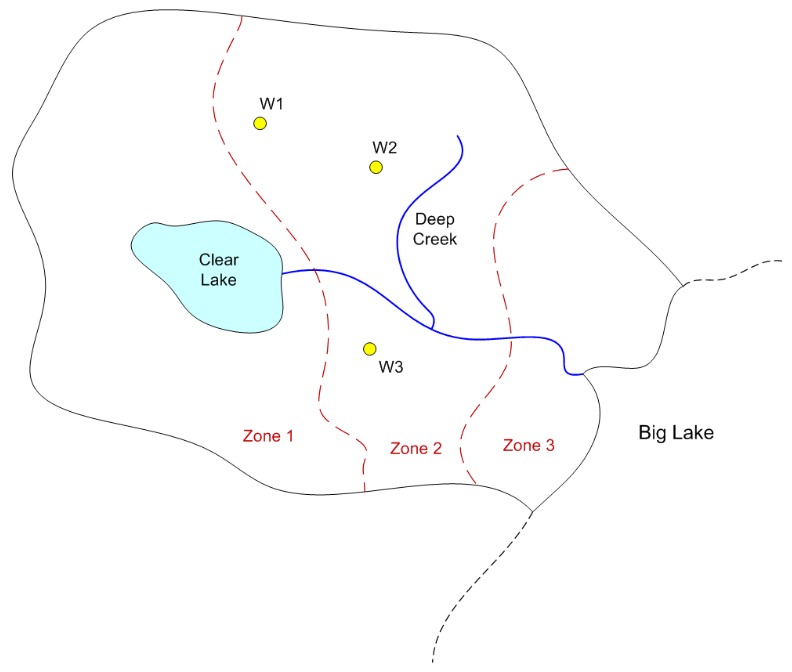
To build the model, do the following:
1) Download and unzip the following file. Launch GMS and open the project file (start.gpr) contained in the zip archive.
2) Set units (m, d)
3) Create a MODFLOW conceptual model
4) Create a boundary coverage using three arcs. Put two separate arcs on right side next to the lake.
5) Duplicate the boundary coverage to make a source/sink coverage. Turn on the following attributes:
Wells
Specified head
General head
River
6) Create spec head boundary on Big Lake side
Spec head = 100 m
7) Create river arcs
a) Calculate conductance per unit length
width = 5 m
vertical thickness = 2 m
K = 0.01 m/d
Cond = Kw/t = (0.01)(5)/(2) = 0.025b) Assign heads and bottom elevations
Head at lake = 120, Rbot = 117
Head at upper right end = 118, Rbot = 115
Head at junction = 110, Rbot = 107
Head at bottom = 100, Rbot = 97
8) Create general head boundary for lake. Build polygons. Note that there is now a polygon for the lake and one for the area outside the lake (variable head zone). Assign the following values to the lake polygon:
a) Stage = 120 m
b) Calculate conductance per unit areaVertical thickness = 4 m
K = 0.01 m/d
Cond = K/t = 0.01/4 = 0.0025
9Create the wells
Flowrates:
Q1 = -4000 m^3/d
Q2 = -3000
Q3 = -2500
10) Duplicate the boundary coverage to make a K coverage. Build three polygons corresponding to the three zones shown on the map. Enter the following K values:
Zone 1: K= 1
Zone 2: K = 2
Zone 3: K = 0.5
11) Duplicate the boundary coverage to build a recharge-elev coverage. Turn on the recharge, top elevation, and bottom elevation attributes. Build a single polgyon and assign the following values:
Recharge = 0.0002 m/d
Top = 120 m
Bottom = 10 m
12) Create a grid frame and fit it to the site.
13) Build the grid.
14) Initialize MODFLOW
15) Activate cells in coverage
16) Map -> MODFLOW
17) Run the Model Checker
18) Save and run the model
Solution
GMS project file with solution: solution.zip
Step-by-step instructions: biglake script.pptx